
What is JDBC?
JDBC stands for Java Database Connectivity,
which is a standard Java API for database-independent connectivity
between the Java programming language and a wide range of databases.
The JDBC library includes APIs for each of the tasks commonly associated with database usage:
- Making a connection to a database
- Creating SQL or MySQL statements
- Executing that SQL or MySQL queries in the database
- Viewing & Modifying the resulting records
Fundamentally, JDBC is a specification that provides a complete set
of interfaces that allows for portable access to an underlying database.
Java can be used to write different types of executables, such as:
- Java Applications
- Java Applets
- Java Servlets
- Java ServerPages (JSPs)
- Enterprise JavaBeans (EJBs)
All of these different executables are able to use a JDBC driver to access a database and take advantage of the stored data.
JDBC provides the same capabilities as ODBC, allowing Java programs to contain database-independent code.
Pre-Requisite:
Before progressing on this tutorial you need to have good understanding on the following two subjects:
JDBC Architecture:
The JDBC API supports both two-tier and three-tier processing models
for database access but in general JDBC Architecture consists of two
layers:
- JDBC API: This provides the application-to-JDBC Manager connection.
- JDBC Driver API: This supports the JDBC Manager-to-Driver Connection.
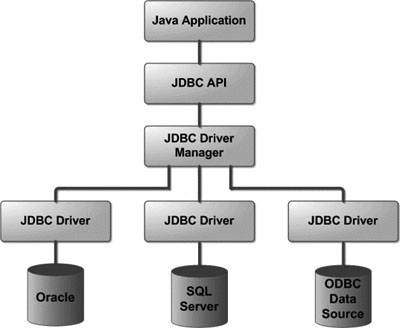
The JDBC API uses a driver manager and database-specific drivers to provide transparent connectivity to heterogeneous databases.
The JDBC driver manager ensures that the correct driver is used to
access each data source. The driver manager is capable of supporting
multiple concurrent drivers connected to multiple heterogeneous
databases.
Following is the architectural diagram, which shows the location of
the driver manager with respect to the JDBC drivers and the Java
application:
Common JDBC Components:
The JDBC API provides the following interfaces and classes:
- DriverManager: This interface manages a list of database drivers. Matches connection requests from the java application with the proper database driver using communication subprotocol. The first driver that recognizes a certain subprotocol under JDBC will be used to establish a database Connection.
- Driver: This interface handles the communications with the database server. You will interact directly with Driver objects very rarely. Instead, you use DriverManager objects, which manages objects of this type. It also abstracts the details associated with working with Driver objects
- Connection : Interface with all methods for contacting a database. The connection object represents communication context, i.e., all communication with database is through connection object only.
- Statement : You use objects created from this interface to submit the SQL statements to the database. Some derived interfaces accept parameters in addition to executing stored procedures.
- ResultSet: These objects hold data retrieved from a database after you execute an SQL query using Statement objects. It acts as an iterator to allow you to move through its data.
- SQLException: This class handles any errors that occur in a database application.
The JDBC 4.0 Packages
The java.sql and javax.sql are the primary packages for JDBC 4.0.
This is the latest JDBC version at the time of writing this tutorial. It
offers the main classes for interacting with your data sources.
The new features in these packages include changes in the following areas:
- Automatic database driver loading
- Exception handling improvements
- Enhanced BLOB/CLOB functionality
- Connection and statement interface enhancements
- National character set support
- SQL ROWID access
- SQL 2003 XML data type support
- Annotations
Structured Query Language (SQL) is a standardized language that allows you to perform operations on a database, such as creating entries, reading content, updating content, and deleting entries.
SQL is supported by all most any database you will likely use, and it allows you to write database code independently of the underlying database.
This tutorial gives an overview of SQL, which is a pre-requisite to understand JDBC concepts. This tutorial gives you enough SQL to be able to Create, Read, Update, and Delete (often referred to as CRUD operations) data from a database.
For a detailed understanding on SQL, you can read our MySQL Tutorial.
Create Database:
The CREATE DATABASE statement is used for creating a new database. The syntax is:
SQL> CREATE DATABASE DATABASE_NAME;Example:
The following SQL statement creates a Database named EMP:
SQL> CREATE DATABASE EMP;Drop Database:
The DROP DATABASE statement is used for deleting an existing database. The syntax is:
Note: To create or drop a database you should have administrator privilege on your database server. Be careful, deleting a database would loss all the data stored in database.SQL> DROP DATABASE DATABASE_NAME;
Create Table:
The CREATE TABLE statement is used for creating a new table. The syntax is:
SQL> CREATE TABLE table_name
(
   column_name column_data_type,
   column_name column_data_type,
   column_name column_data_type
   ...
);
Example:
The following SQL statement creates a table named Employees with four columns:
SQL> CREATE TABLE Employees
(
   id INT NOT NULL,
   age INT NOT NULL,
   first VARCHAR(255),
   last VARCHAR(255),
   PRIMARY KEY ( id )
);
Drop Table:
The DROP TABLE statement is used for deleting an existing table. The syntax is:
SQL> DROP TABLE table_name;Example:
The following SQL statement deletes a table named Employees:
SQL> DROP TABLE Employees;INSERT Data:
The syntax for INSERT looks similar to the following, where column1, column2, and so on represent the new data to appear in the respective columns:
SQL> INSERT INTO table_name VALUES (column1, column2, ...);Example:
The following SQL INSERT statement inserts a new row in the Employees database created earlier:
SQL> INSERT INTO Employees VALUES (100, 18, 'Zara', 'Ali');SELECT Data:
The SELECT statement is used to retrieve data from a database. The syntax for SELECT is:
The WHERE clause can use the comparison operators such as =, !=, <, >, <=,and >=, as well as the BETWEEN and LIKE operators.SQL> SELECT column_name, column_name, ... FROM table_name WHERE conditions;
Example:
The following SQL statement selects the age, first and last columns from the Employees table where id column is 100:
The following SQL statement selects the age, first and last columns from the Employees table where first column contains Zara:SQL> SELECT first, last, age FROM Employees WHERE id = 100;
SQL> SELECT first, last, age
     FROM Employees
     WHERE first LIKE '%Zara%';
UPDATE Data:
The UPDATE statement is used to update data. The syntax for UPDATE is:
The WHERE clause can use the comparison operators such as =, !=, <, >, <=,and >=, as well as the BETWEEN and LIKE operators.SQL> UPDATE table_name SET column_name = value, column_name = value, ... WHERE conditions;
Example:
The following SQL UPDATE statement changes the age column of the employee whose id is 100:
SQL> UPDATE Employees SET age=20 WHERE id=100;DELETE Data:
The DELETE statement is used to delete data from tables. The syntax for DELETE is:
The WHERE clause can use the comparison operators such as =, !=, <, >, <=,and >=, as well as the BETWEEN and LIKE operators.SQL> DELETE FROM table_name WHERE conditions;
Example:
The following SQL DELETE statement delete the record of the employee whose id is 100:
SQL> DELETE FROM Employees WHERE id=100;
JDBC - Java Database Connectivity Tutorials
Java Database Connectivity or in short JDBC is a technology that enables the java program to manipulate data stored into the database. Here is the complete tutorial on JDBC technology.

- What
is JDBC?
JDBC is Java application programming interface that allows the Java programmers to access database management system from Java code. It was developed by JavaSoft, a subsidiary of Sun Microsystems.
- Product
Components of JDBC
JDBC is consists of four Components: The JDBC API, JDBC Driver Manager, The JDBC Test Suite and JDBC-ODBC Bridge.
- Understanding
JDBC Architecture
JDBC is an API specification developed by Sun Microsystems that defines a uniform interface for accessing various relational databases. JDBC is a core part of the Java platform and is included in the standard JDK distribution.
- JDBC
Driver and Its Types
The JDBC DriverManager class defines objects which can connect Java applications to a JDBC driver. DriverManager has traditionally been the backbone of the JDBC architecture. It is quite small and simple.
- JDBC
Versions From First To Latest
- Relational
Database Concepts
- Understanding
Common SQL Statements
This section describes SELECT, INSERT, UPDATE and DELETE statements.
- Important
JDBC Concepts
This section introduces you with Transactions, logging, isolation and concurrency concepts.
- Introduction
to the java.sql Package
- Understanding
Driver Manager
- Understanding
Data Source
- Understanding the Connection Object
JDBC Examples with MySQL
- JDBC
MySQL Tutorial
JDBC Tutorials with MySQL Database. MySQL is one of the widely used database in the world.
- Connecting
to a MySQL Database in Java
In this section, you will learn how to connect the MySQL database with Java file. We need to establish a connection between MySQL and Java files so that we can use MySQL driver for MySQL.
- Creating
a Database Table
Here, providing you an example with code and it's description that helps you to create a database table in a database through the java file.
- Creating
a MySQL Database Table to store Java Types
Dear user, consider a case where we need to store a java types in our database table. This section describes how to create a MySQL database table that stores all java types.
-
Deleting
a Table from Database
This section describes how to delete a table from database. Java provide the facility for deleting a specific table from a given database with the help of some specified methods.
-
Retrieving
Tables from a Database
This section provides you a facility for retrieving tables from a specific database through an example. You have to know about a database that is a collection of data or information.
-
Inserting
values in MySQL database table
Here we are going to see, how we can insert values in the MySQL database table. We know that tables store data in rows and column format. After creating a database table, you insert the values in it.
-
Retrieving
All Rows from a Database Table
Here, you will learn how to retrieve all rows from a database table. You know that table contains or stores the data in rows and columns format. If you want to access the data from a table then you need to use some APIs and methods.
-
Getting
Column Names from a database table in Java
Here, providing you an example with code that retrieves all columns name in a specific database table. Sometimes, you need to know the number of columns and the names of the columns of the table then you can retrieve it with the help of this example.
-
Deleting
All Rows from a Database Table
Consider a case where we have been given one database table, now we have to delete all the rows from the table. This section describes for deleting all rows from a specific database table.
-
Delete
a Specific Row from a Database Table
Consider a case where we are creating a table and we have add some data in it. It may happen that we might add a wrong data in a row, now we need to delete that particular data. This can be done very easily , and in this section we are going to do the same that is, how to delete a specific row from a specific database table.
-
Join
tables in the specific database
In this section, we are going to consider how to join two or more tables in a specific database. For this you need to have two or more table in the database. If two or more tables are available in the database then Join operation is performed otherwise not.
-
Join
tables with the NATURAL LEFT JOIN operation
This section describes the NATURAL LEFT JOIN operation and how to retrieve data through it. In this operation we are going to retrieve data according to match the field name of another tables.
-
Join
tables with the NATURAL RIGHT JOIN operation
This section describes the NATURAL RIGHT JOIN operation of table in a specific database. This operation join tables on the basis of matching fields but priority will be given to the right table field values.
-
Cross
Join Tables in a Specific Database
This section introduces you to the cross join between two tables. The cross join operation retrieves data between two tables as a Cartesian product of set theory in mathematics. All data show to multiply by each rows.
- JDBC (Java Database Connectivity) -Tutorials
JDBC is essentially an Application Programming Interface (API) for executing SQL statements, and extracting the results. Using this API, we can write database clients, such as Java applets, servlets and Enterprise JavaBeans, that connect to a relational database, such as Oracle, MySQL, Sybase, Informix, Ingres, PostgreSQL, or any other database that implements this API, execute SQL statements, and process the results extracted from the database.
- First
Step towards JDBC
This article introduce you with JDBC and shows you how to create a database application to access the databases.
- Accessing
the Database from Servlet
This article shows you how to access database from servlets. Here I am assuming that you are using win95/98/2000 and running Java Web Server.

No comments:
Post a Comment